

Description
Colorful Browser Theme with Dark Tabs
Overview
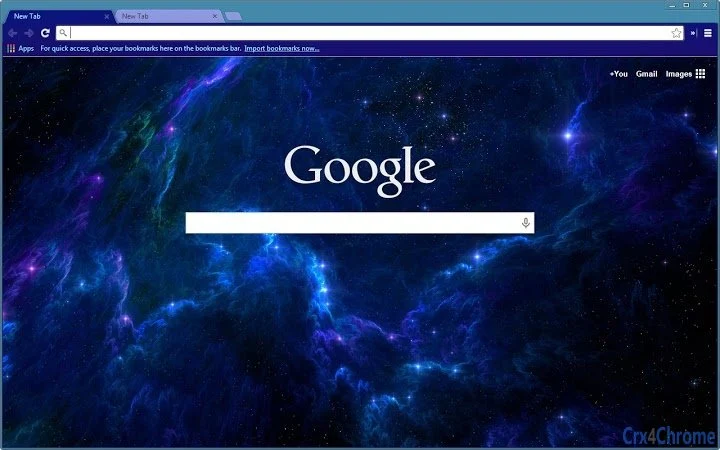
The software is a browser theme designed to enhance the visual experience of web browsing through dynamic color schemes and modern UI elements. With dark-blue tabs for improved navigation and a radiant blue sky background, the theme transforms the browser interface into a visually engaging environment. It is tailored for users who value aesthetic customization and want to personalize their browsing space without compromising functionality. The theme supports resolutions up to 2560x1600, ensuring sharp visuals across high-definition displays. It is suitable for casual users, design enthusiasts, and anyone seeking a more vibrant digital workspace.
Developed with a focus on visual appeal, the theme leverages a background sourced from desktopnexus.com, contributing to its polished appearance. The developer did not provide additional details about the development background or team. Real-world usage scenarios include personal browsing, content creation workflows, and digital workspace customization. The theme is intended to be used in conjunction with compatible browsers, offering a non-intrusive way to refresh the browser’s look and feel.
Key Features & Capabilities
- Dark-blue tabs – Enhance navigation clarity with a sleek, contrasting tab design that stands out while maintaining a modern, minimalist aesthetic.
- Radiant blue sky background – Provides a calming and visually striking backdrop for new tabs, improving the overall browsing atmosphere.
- High-resolution support – Optimized for displays up to 2560x1600, ensuring crisp visuals across a wide range of screen sizes and densities.
- Frame color customization – Allows users to adjust the frame color, offering a level of personalization to match individual preferences or other desktop themes.
- Updated promo visuals and icon – Reflects a refined design approach with improved graphical assets for better presentation and user recognition.
- Theme cleanup – Streamlined code and assets to ensure stability and reduce potential conflicts with browser extensions or settings.
These features are ideal for users who want to create a more immersive browsing experience. For example, a designer might use the theme to align their browser interface with a project’s color palette. A student could benefit from the improved visual contrast during long study sessions. The theme’s focus on aesthetics over functionality makes it a practical tool for those who prioritize interface beauty in their daily digital interactions.
User Interface, Workflow & Performance
The user interface is minimal and focused solely on visual presentation, as expected from a browser theme. Navigation within the theme settings is straightforward, relying on the browser’s built-in extension management system. Users can apply or switch themes through a simple menu, with no complex workflows required. The design emphasizes visual harmony, with the dark-blue tabs and radiant sky background working together to create a balanced layout.
Performance impact is expected to be negligible, as browser themes typically do not consume significant system resources. The developer did not specify resource usage details. General software behavior suggests that such themes operate efficiently without affecting browser speed or responsiveness. Stability is maintained through regular updates and code cleanup, as noted in the latest release. No performance issues were reported in the provided information.
Compatibility & System Requirements
The software is compatible with Windows, Mac, and Linux operating systems, making it accessible to a broad user base. It is designed to work with browsers that support custom themes, though specific browser names were not provided. The installation size is 2.3 MB, which is minimal and suitable for quick deployment.
Exact system requirements were not listed. The developer did not provide details on minimum CPU, RAM, or graphics specifications. Compatibility information is limited to the supported platforms. Users should ensure their browser supports theme customization to use the software effectively. No known conflicts with other software were mentioned.
Pros and Cons
Pros
- Visually appealing design with a vibrant sky background and dark-blue tabs
- Supports high-resolution displays up to 2560x1600
- Lightweight at only 2.3 MB
- Includes frame color customization for personalization
- Regular updates and clean codebase improve stability
Cons
- No information on supported browsers was provided
- Resource usage details were not specified
- Functionality is limited to visual customization only
- Developer background and support channels are not disclosed
- May not be compatible with older or less common browsers
FAQ Section
Is this theme compatible with my browser?
The software is designed for browsers that support custom themes, but specific browser compatibility was not listed by the developer. Users should check their browser’s theme settings to confirm support.
Is the software safe to use?
As a browser theme, the software does not access personal data or system files. It operates within the browser’s sandboxed environment. No security risks were reported in the provided information.
How do I update the theme?
Updates are managed through the browser’s extension or theme management system. The latest version is 1.1, released on March 15, 2024.
Can I use this theme offline?
Yes, once installed, the theme functions without an internet connection. It relies only on local browser resources.
What type of license does this software have?
The software is free to use and distribute. No licensing restrictions were mentioned in the provided details.
Final Thoughts + CTA
This browser theme delivers a refreshing visual upgrade for users seeking a more colorful and engaging browsing experience. Its dark-blue tabs and radiant blue sky background stand out on high-resolution screens, offering both aesthetic appeal and functional clarity. While it serves a narrow purpose—visual customization—it does so effectively and with minimal overhead. The inclusion of frame color adjustment and regular updates adds meaningful depth to a simple concept.
It is best suited for individuals who enjoy personalizing their digital environment, especially those using modern browsers on Windows, Mac, or Linux. The lack of detailed developer information or browser-specific compatibility is a minor drawback, but not a dealbreaker for a free theme. Overall, it represents a polished, lightweight solution for enhancing browser appearance.
Download Colorful Browser Theme with Dark Tabs now
Guides & Tutorials for Blue Radiance Theme for Chrome
How to install Blue Radiance Theme for Chrome
- Click the Preview / Download button above.
- Once redirected, accept the terms and click Install.
- Wait for the Blue Radiance Theme for Chrome download to finish on your device.
How to use Blue Radiance Theme for Chrome
This software is primarily used for its core features described above. Open the app after installation to explore its capabilities.
User Reviews for Blue Radiance Theme for Chrome 0
No reviews found





